Plugins are useful. They add forms, galleries, sliders, SEO tools, security features, calendars, payment functions, and dozens of other features to a website without needing everything custom-built from scratch.
But every plugin comes with a responsibility: it needs to be maintained.
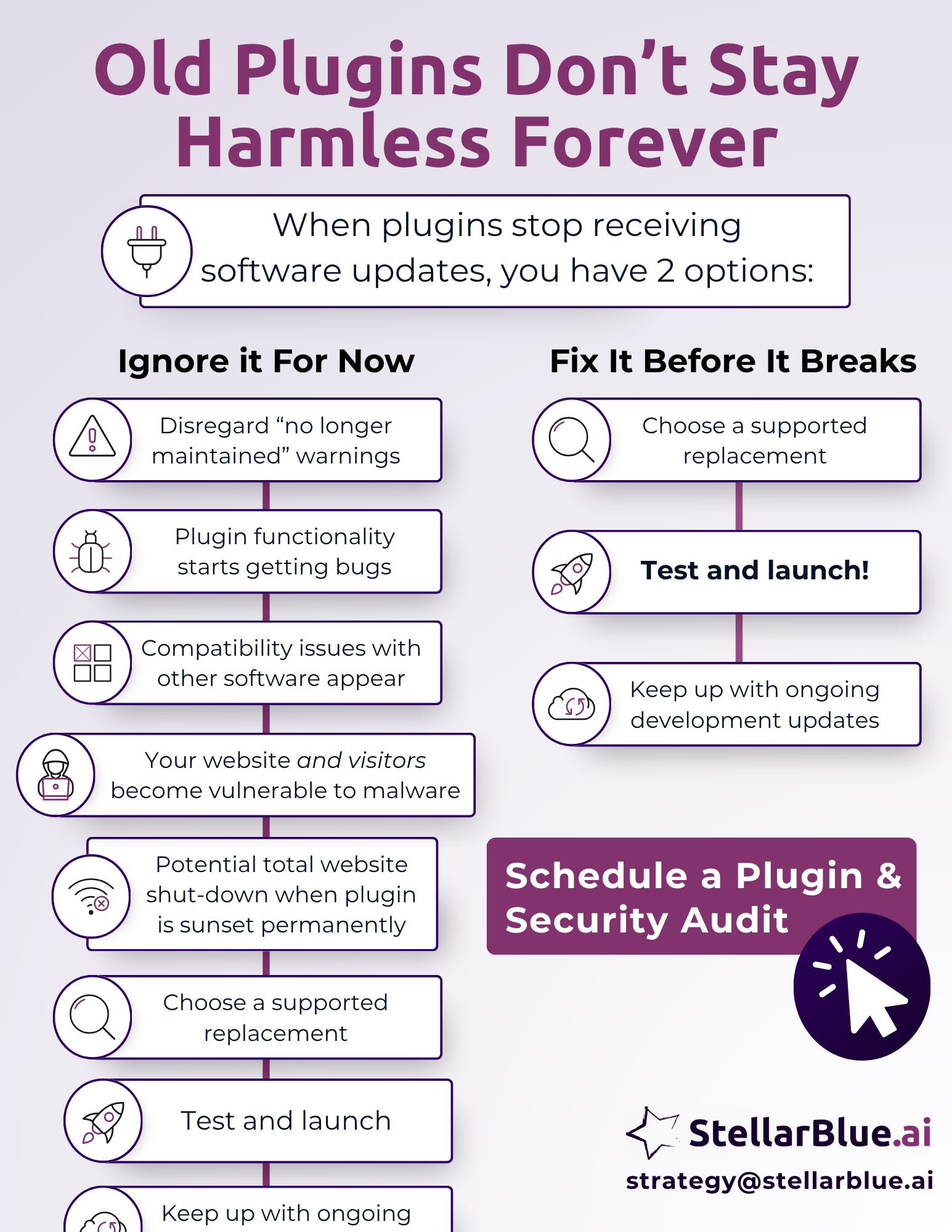
A plugin that simply needs an available update is one thing. That’s normal website maintenance. A bigger issue happens when a plugin is no longer receiving updates at all. That means the developer has stopped supporting it, security patches are no longer being released, compatibility fixes are no longer being made, and the plugin may eventually be removed, replaced, or shut down.
That’s when a helpful tool can become a long-term risk.
For businesses that rely on their website for leads, sales, recruiting, support, or customer trust, abandoned plugins can quietly create problems that get worse over time.
What Is An Outdated Plugin?
An outdated plugin is often used as a broad phrase, but there are two very different situations.
The first is a plugin that has an update available. Maybe your form plugin, SEO plugin, or page builder released a new version last week. In that case, the plugin is still being maintained. It just needs to be updated, tested, and monitored.
The second is a plugin that no longer receives software updates at all. This is the bigger concern. These plugins may be abandoned by the developer, removed from active support, replaced by newer tools, or phased out because they no longer meet modern website standards.
That second type is what we’re focusing on here.
An abandoned plugin may still appear to work for a while. The button still shows up. The form still loads. The gallery still displays. But behind the scenes, the code is aging while the rest of the website, browser environment, hosting stack, and security landscape keep moving forward.
That gap creates risk.
CISA maintains a catalog of known exploited vulnerabilities to help organizations manage vulnerabilities that have been used in real-world attacks. That matters because old, unsupported software can become an easy target when vulnerabilities are discovered and never patched.
Why Unsupported Plugins Become A Problem
Websites are connected systems. Your content management system, theme, plugins, hosting environment, browser requirements, security tools, and third-party integrations all need to keep working together.
When one plugin stops being maintained, it slowly falls out of step with the rest of the site.
That can lead to:
- Broken features
- Slower performance
- Conflicts with other plugins
- Security warnings
- Increased bot activity
- Malware exposure
- Form failures
- Checkout issues
- Layout problems
- Complete site crashes after major updates
The hard part is that these issues often don’t happen all at once. They build gradually.
The Warning Signs Usually Start Small
The first sign is often a warning inside the website dashboard.
You may see a message saying the plugin hasn’t been tested with the latest version of your content management system. You may see a notice that maintenance is no longer being upheld. In some cases, the plugin may disappear from the official plugin directory or stop showing release notes.
At this stage, the site might still look fine to visitors, which is why these warnings are easy to ignore.
But those alerts are usually telling you something important: the plugin is no longer keeping pace with the software around it. What works today may not work after the next core website update, theme update, or browser change.
This is the right time to act, before the issue becomes visible to users.
Then The Bugs Begin
Once a plugin stops receiving updates, small bugs often start showing up.
A form might stop sending notifications. A calendar might display incorrectly. A slider might load slowly. A popup might stop triggering. A search filter might miss results. A checkout add-on might create errors that are difficult to trace.
These issues can look random, but they often come from the same root cause: old code trying to operate in a newer environment.
For business owners and marketing teams, this creates a frustrating situation. The website technically still exists, but key pieces become unreliable. That can affect leads, conversions, analytics, user experience, and internal trust in the website.
Compatibility Issues Follow
Plugins rarely operate alone.
One plugin may rely on another plugin. A form plugin may connect to a CRM. A security plugin may monitor login behavior. A page builder may control how several other plugins appear on the page. A payment plugin may rely on specific server settings or API connections.
When one unsupported plugin starts falling behind, it can create conflicts with the rest of the site.
This may happen when:
- Another plugin releases an important update
- The website’s core software updates
- The theme is updated
- The hosting environment moves to a newer PHP version
- A browser changes how certain scripts are handled
- A third-party service changes its API
That’s when one old plugin can create a chain reaction.
The site owner may think, “We just updated one thing and now something else is broken.” In reality, the unsupported plugin may have been the weak link for months.
Bot Traffic Can Start To Rise
Security is one of the biggest concerns with abandoned plugins.
When developers actively maintain plugins, they can release patches when vulnerabilities are discovered. When a plugin is abandoned, those patches may never come.
That creates an opportunity for automated bots.
Bots constantly scan websites looking for known weaknesses in plugins, themes, login pages, forms, and other entry points. Research on content management system security notes that automated scanners are commonly used to gather information about installed CMS software, plugins, themes, versions, and users.
When a plugin is no longer secured, bots may begin hitting the site more often. That can show up as unusual traffic spikes, fake form submissions, login attempts, server strain, suspicious URLs, or strange analytics patterns.
Higher bot activity can also affect site performance. Even if the bot traffic doesn’t immediately compromise the site, it can waste server resources, distort reporting, and create more noise for your team to manage.
Malware And Security Risks Become More Serious
As the plugin gets older, the risk grows.
Unsupported plugins can expose the site to malware, spam injections, redirects, unauthorized access, data exposure, and other security issues. WordPress plugin vulnerabilities have been actively exploited in real-world campaigns, including attacks that target old security issues to gain control of websites.
For businesses, this isn’t only a technical problem. It can become a trust problem.
If visitors are exposed to malware warnings, strange redirects, spam pages, or broken forms, they may leave immediately. Search engines may also flag compromised pages, which can damage visibility and credibility.
The risk extends beyond the website owner. Visitors, customers, applicants, donors, and partners may all interact with the site. If the plugin affects forms, login areas, payment steps, or personal information, the stakes are higher.
The Site Could Eventually Break Completely
The final stage is the one most businesses want to avoid: the plugin fails entirely.
That can happen when the plugin is permanently shut down, removed, or no longer compatible with an important update. It can also happen after a major software, hosting, security, or theme update.
When that happens, the result may be more than a small visual bug.
A broken plugin can cause:
- Pages to fail loading
- Forms to stop submitting
- Admin areas to become inaccessible
- Checkout flows to break
- Layouts to collapse
- Error messages to appear publicly
- The full website to go down
At that point, the issue becomes urgent, more expensive, and more disruptive.
A planned replacement is almost always better than an emergency repair.
A Plugin Audit Is A Business Decision
Plugin maintenance may sound technical, but the impact is operational.
If your website supports lead generation, customer service, recruiting, donations, transactions, or brand credibility, unsupported plugins deserve attention. They can affect the people who use the site and the teams that depend on it.
The better question is not, “Is the plugin working today?”
The better question is, “Can we trust this plugin to keep working safely six months from now?”
If the answer is unclear, it’s time to review it.
How StellarBlue.ai Can Help
At StellarBlue.ai, we help organizations identify website risks before they become expensive problems.
Our team can review your site’s plugins, flag unsupported or abandoned tools, identify where they’re being used, and recommend safer replacements. When needed, we can also rebuild functionality in a more stable way, clean up old code, and improve the long-term health of your website.
A maintained website is easier to protect, easier to improve, and easier to trust.